 Deynbook
A record of what customers owe
A deyn book is a customer debt record. When a business gives a customer goods or services on credit, it records the amount owed. Later payments reduce that balance. The record can be a notebook or a digital ledger.
For a pharmacy, shop, small restaurant or another business that sells on credit, the question is the same: who owes money, how much have they paid, and what remains?
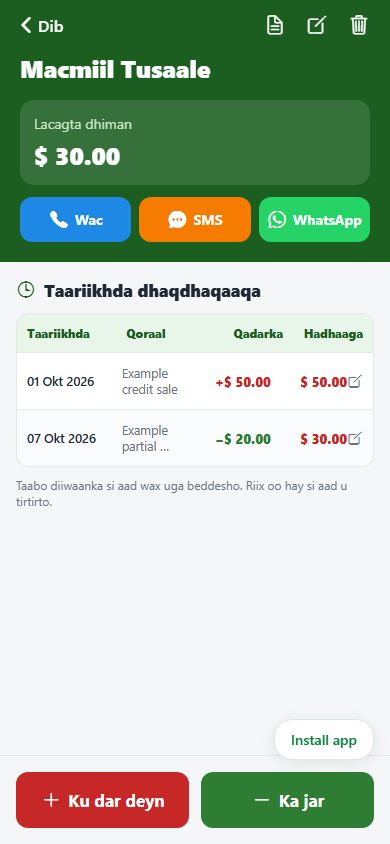
Example: $50 owed, $20 paid, $30 remaining
This is an illustrative example, not a real customer account. A customer takes goods worth $50 on credit, then pays $20 a few days later.
| Record | Debt added | Payment | Remaining |
|---|---|---|---|
| Credit sale | $50 | — | $50 |
| Partial payment | — | $20 | $30 |
Remaining balance = recorded debts − recorded payments. Keep both entries rather than replacing the original $50 with $30. That preserves the history of how the balance changed.
What to write down
- Customer: a name that identifies the person clearly; add contact details where useful.
- Debt: the amount, date and a brief explanation of the credit sale.
- Payment: the amount and date, including partial payments.
- Balance: the remaining amount after each entry.
Review entries with the customer when resolving a disagreement. A ledger records the transactions you enter; its accuracy still depends on recording them correctly.
Paper or digital?
A notebook can work, but finding past entries and checking totals becomes harder as records grow. A digital debt book keeps each customer’s transactions together and calculates the balance from those entries.
Before moving existing balances into a new system, check them against your current records. Do not enter the same opening debt twice or assume an old balance is correct without reviewing it. Follow the paper-to-digital checklist.
How to record this in Deynbook
- Open Macaamiisha (Customers) and add or select the customer.
- Record a debt of $50 with its date and an optional note.
- When the customer pays, use Ka jar to record a payment of $20.
- Review the customer’s history and check that the remaining balance is $30.
Deynbook also separates supplier debts from customer debts and includes inventory records. Android supports offline recording after sign-in; the web app needs internet to read and save records.
Read how to record partial payments. Follow the getting-started steps or check the trial and annual plan.
Put your records in one place
Prefer Android? See download and installation instructions. iPhone and PC users can use the browser version.