 Deynbook
Check the balance before recording a payment
A partial payment is a payment smaller than the amount the customer owes. A customer with a $50 debt may pay $20 today and the remaining $30 later. Each payment belongs in the customer’s transaction history.
First confirm the customer’s name, current balance, amount received and payment date. A name alone may not distinguish two people with similar names. Check contact details or the existing record before adding money to the wrong account.
Record the payment as a separate entry
- Open Macaamiisha and select the customer.
- Check the customer’s history and current balance.
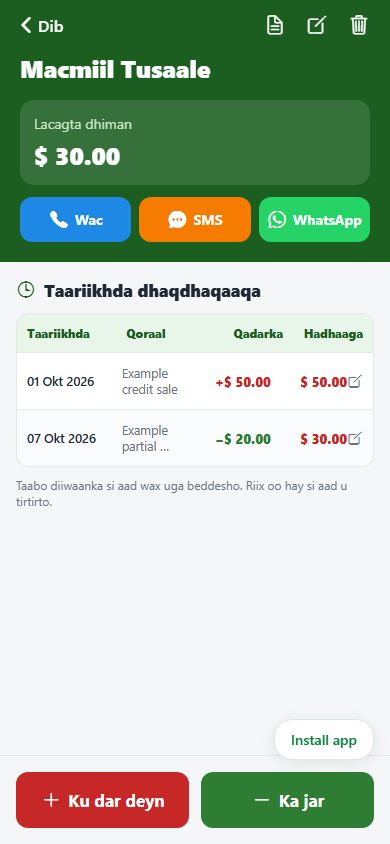
- Select Ka jar to subtract a payment from the customer debt.
- Enter the amount actually received: $20 in this example. Check the date and add a note if it helps identify the payment.
- Save once, then check the history. The original $50 debt and the new $20 payment should both remain visible.
On the web app, wait for the server to confirm the save. If the connection fails, check the history before trying again so you do not record the same payment twice.
Check the result: $30 remains
$50 original debt − $20 payment = $30 remaining. The example screenshot below uses invented records. The red entry adds the original debt; the green entry subtracts the payment. The balance after the second entry is $30.
Do not change the original debt to $30 instead of recording the payment. That removes the explanation of why the balance changed. If the customer later pays $10, add a new $10 payment; the remaining balance becomes $20.
Resolve mistakes before adding more entries
If a balance looks wrong, compare the amounts and dates with your paper record or payment evidence. Look for a payment entered twice, a debt added twice, a missing transaction or an entry assigned to the wrong customer.
A payment record shows what you entered; it does not independently prove that money arrived. Confirm receipt first. If you receive one payment covering several customers or accounts, agree how it should be allocated and record only the amount belonging to each account.
Do not add another payment just to make a disputed total look right. Correct the mistaken entry after checking what happened, then review the new balance.
Make a short end-of-day check
- Record payments soon after receiving them.
- Use a useful note rather than only “paid” when several payments are easy to confuse.
- Review the day’s entries and compare them with your payment records.
- Keep the original evidence where your business normally stores it.
A pharmacy, shop or small restaurant can use the same routine whenever a customer settles part of a debt.
Need the basics first? Read what a deyn book records. Moving older balances? Follow the paper-to-digital checklist.